How do I enable or disable my Lincoln vehicle's Wi-Fi Hotspot?
To enable the Wi-Fi® Hotspot* feature, follow the steps below.
To use your Lincoln vehicle's Wi-Fi Hotspot feature:
- Your vehicle must be equipped with a modem.
- Your vehicle must be equipped with Wi-Fi capabilities.
- Your vehicle's modem must be activated.
Note: Before using the Wi-Fi Hotspot feature, you must first set up a Wi-Fi data plan with AT&T. Your vehicle may be eligible for a complimentary 3-month or 3GB trial.
Turning Your Vehicle's Wi-Fi Hotspot On or Off
Select a dropdown below for steps to turn your Wi-Fi Hotspot on or off. If you need assistance determining the SYNC®** generation of your vehicle, use the SYNC Visual Reference Guide.
Lincoln Digital Experience
- Select the six-dot Apps Drawer icon on your vehicle's Digital Experience screen.
- Choose Hotspot.
- Connect your device to the vehicle's hotspot by scanning the code on the Digital Experience screen with your device or following the text instructions on the Digital Experience screen.
SYNC 4
- Select Settings on the SYNC screen.
- Scroll sideways and select Wi-Fi & Hotspot.
- Select the Vehicle Hotspot tab.
- Use the toggle to turn the Wi-Fi Hotspot on or off. Blue indicates on, and gray indicates off.
SYNC 3
- Select Settings on the SYNC screen.
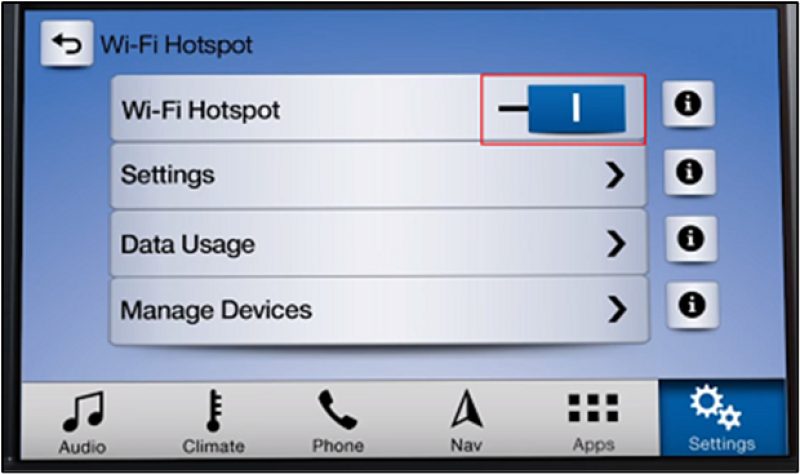
- Scroll sideways and select Wi-Fi & Hotspot. The following options display:
- Wi-Fi Hotspot
- Settings
- Data Usage
- Manage Devices
Use the toggle to turn the Wi-Fi Hotspot on or off. Blue indicates on, and gray indicates off.
Additional Information
How do I set up a data plan for the Wi-Fi Hotspot?
How do I find the password for my Wi-Fi Hotspot?
How do I change the Wi-Fi Hotspot Password?
Is my vehicle equipped with a Wi-Fi Hotspot?
How do I connect a device to the Wi-Fi Hotspot in my vehicle?
What do I do if I am having issues with the Wi-Fi Hotspot in my Lincoln?
*Wi-Fi® hotspot includes complimentary wireless data trial that begins upon AT&T activation and expires at the end of three months or when 3GB of data is used, whichever comes first. To activate, go to www.att.com/Lincoln. Don’t drive distracted or while using handheld devices. Use voice controls.
**Don't drive while distracted or while using handheld devices. Use voice-operated systems when possible. Some features may be locked out while the vehicle is in gear. Not all features are compatible with all phones.
Wi-Fi is a registered trademark of Wi-Fi Alliance®.